
Need to ask your members what they think? Run a volunteer sign-up, a booking form or a feedback questionnaire? You don't need a paid survey tool. Every Voice website comes with a full Surveys app built in, and it's completely free.
We've just given Surveys a big overhaul, so it's a great time to take a look.
Why not just use a free survey site?
Plenty of online survey tools have a free plan, but they usually come with strings attached: a cap on how many questions you can ask or how many responses you can see, their branding all over your form, and the nice features kept behind a monthly subscription.
With Voice there's none of that:
- No limits on the number of surveys, questions or responses.
- No adverts and no "upgrade now" nags.
- It lives on your own website, in your own colours, rather than sending people off somewhere else.
- Your data stays with you. Responses aren't shared with an outside survey company.
What can it do?
Quite a lot, it turns out!
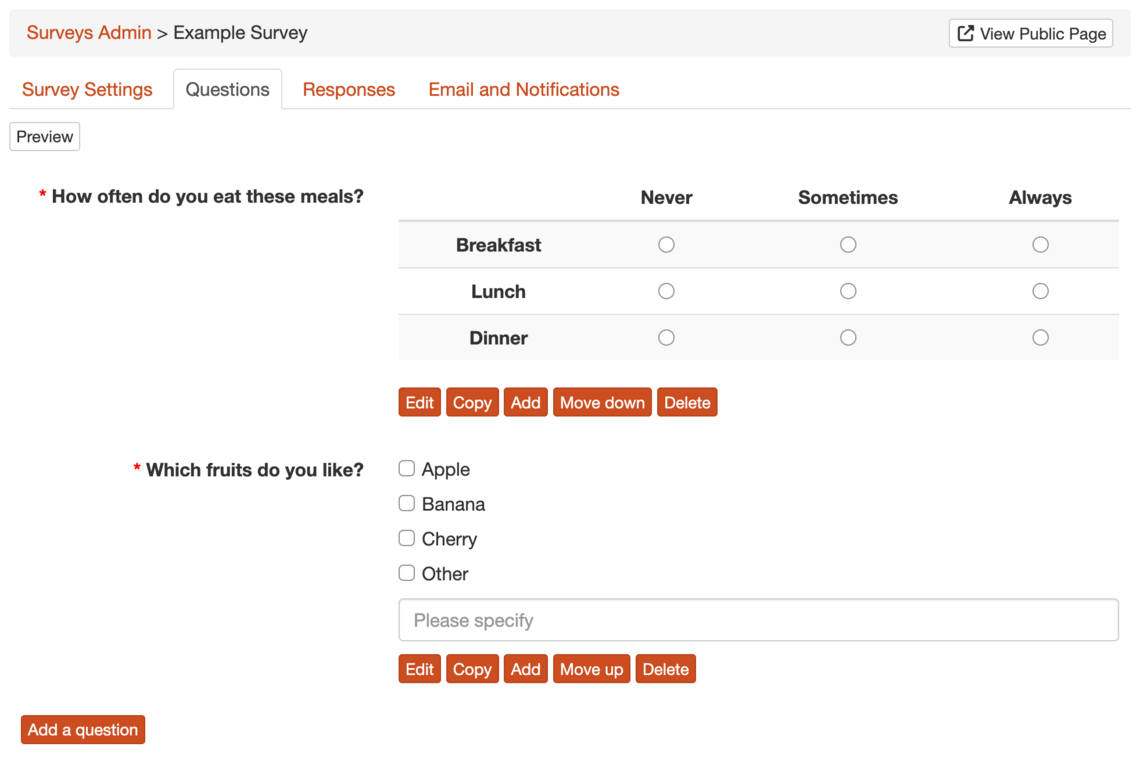
- Lots of question types: short and long text answers, numbers, email addresses, dates, yes/no, drop-downs, radio buttons, checkboxes, grids of questions with the same answers (great for "rate each of these" questions), and file uploads.
- Multi-page surveys: split a long survey into sections, each on its own page if you like.
- Conditional sections: only show a section to people who gave a particular answer earlier on. So if someone says they're a volunteer, they get the volunteer questions, and everyone else skips them.
- Embed a survey in any page: drop a form right into a page on your site, such as a membership form on your "Join Us" page.
- Your own thank-you page: send people to a page of your choice when they've finished.
- Opening and closing dates: set a survey to open and close automatically. Outside those dates visitors see a friendly message instead of the form.
- Spam protection: public surveys show a CAPTCHA to visitors who aren't logged in.
- Preview as you build: click through your survey exactly as a respondent would, without saving anything.
- Copy a survey: reuse last year's questionnaire as a starting point.
Seeing the results
Responses are stored safely on your site, where you can:
- See a summary of the answers to each question.
- Look through each person's full response.
- Download everything as a spreadsheet (CSV) to open in Excel, Google Sheets or LibreOffice.
- Get an email when someone responds, either straight away or as an hourly or daily round-up.
- Delete all the responses in one go when a campaign is over, so you're not holding on to personal data you no longer need.
Collecting something sensitive?
For things like safeguarding reports or health information, you might rather not keep responses on a website at all. You can now switch off Store Responses and have each response emailed straight to a list of people instead. Each person on the list gets their own copy, so nobody sees anyone else's email address.
Getting started
If you already have a Voice site, go to Content > Applications in your admin pages and enable Surveys. The Surveys documentation walks you through building your first one, and you can ask questions in the forums.
Don't have a Voice site yet? Voice provides free websites for charities, voluntary organisations and community groups. Have a look at all the other website features, then create your free website.