
It was agreed at the Annual General Meeting in 2023 that our website would be used to store the agendas and minutes of committee meetings as well as many other important documents.
The idea is that all members will be able to stay connected with the decisions that the committee is making on their behalf and have ready access to a wealth of information about the allotments and about allotments in general.
This website costs us nothing, has no advertising and does not track or store your data as Facebook does!
Much of the website is available for anyone online to read but the agendas and minutes etc are stored in a private area called “Our Files”
This area is accessible ONLY to current members of the Wembury Allotment Association.
To gain access you need to firstly register for a login to Voice Online communities and secondly get approved as a genuine Wembury Allotment Association member by the site administrator
It should hopefully be intuitive but full instructions follow.
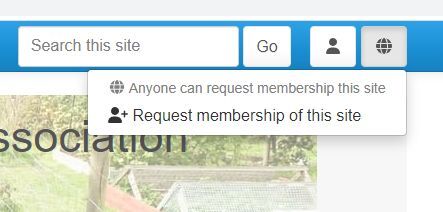
In order to gain access to this area you will need to click on the Site Membership menu
This is the globe icon in the screenshot.
Click “Request membership of this site” and follow the instructions which I have copied below.
This takes you to the Log in page.
Near the bottom, underneath the Log in button, click the link: Register now for your login to Voice Online Communities
You will now be on the Registration page.
Enter your Email address, First names and Last name, and choose a Password. PLEASE USE THE SAME EMAIL ADDRESS YOU USE TO COMMUNICATE WITH WEMBURY ALLOTMENT ASSOCIATION.
This is because once you have registered for Voice Online Communities I will be sent a message from the system asking me to confirm your membership of Wembury Allotments Association which I will do as soon as possible. This is to ensure that our personal information is read only by our members.
You can optionally choose a Screen name, which will be used in place of your real name in discussion forums.
Note: You need to enter the password twice.
Click the Next button.
If there are errors on the form (e.g., you have entered an invalid email address or an insecure password) then correct the errors before clicking Next again.
On this second page you can choose whether to opt in to emails from Voice.
Tick the box to accept the Terms and Conditions then click the Next button. (You can of course read the Terms and Conditions by clicking the link, but nobody ever does, right?)
An email will be sent to you to confirm your registration.
Follow the instructions on the email to log in. If the email doesn't arrive please check for it in your 'junk' or 'spam' email folder, if applicable.
After clicking the link in the email you will be able to log in.
Once you have logged in, you can click Your Account in the User Menu to change your details: